Google Vault Converter for Windows Convert Vault Exports to PST, PDF, EML and More
Vault Converter reads the files that Google Vault in Google Workspace gives you and converts them to formats you can open, search and move. Gmail, Drive, Chat, Groups, Voice, Calendar and Gemini are all supported.
One-time licenseWindows 10 and 11Trial converts the first 10 messages of every MBOX file
- Eight Gmail formats plus mailbox upload
- Gmail labels become folders
- One PST for every account
- Reads ZIP exports without unzipping
- Original export stays unchanged
- File output works offline
A Vault Export Is Not Ready to Use
Google gives you the data. It does not give you an organized mailbox or a readable archive.
Labels Become One Folder
Vault does not convert Gmail labels to folders. Every message goes into one folder and your old structure is gone. The Google Vault Gmail Converter rebuilds it.
MBOX Needs Conversion for Outlook
Google lists Thunderbird for MBOX and Outlook for PST. Convert MBOX with the Google Vault to PST Converter before your team opens it there.
Export Files Are Deleted After 15 Days
Vault keeps export files for 15 days from the start of the export, so download early. If a link has expired, open Google Vault Export Errors and Fixes.
Vault Export, Manual Route or Vault Converter
See what every route gives you before you choose one.
| What you need | Vault export alone | Manual route | Vault Converter |
|---|---|---|---|
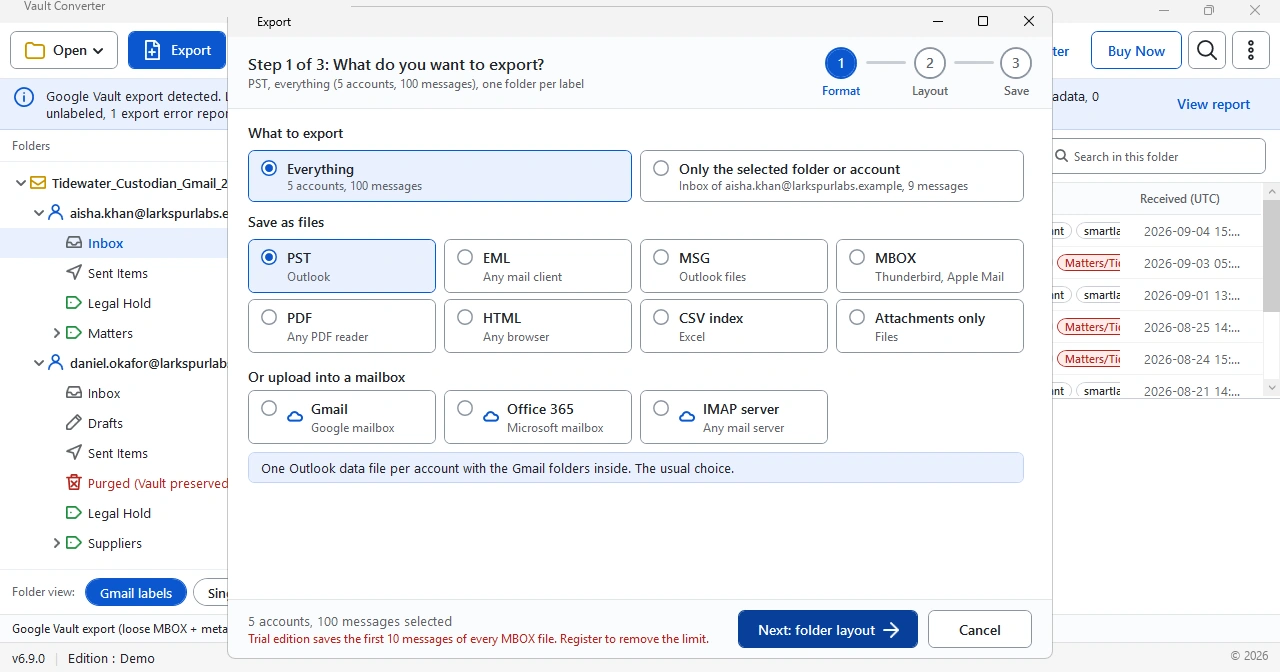
| Gmail output | PST or MBOX files | Import the MBOX into a mail client first, then save from there | Eight file formats or an upload into a mailbox |
| Gmail labels | Not converted into folders. All messages appear in one folder | The mail client shows that same folder | Choose one folder per label, or save every message once with the other labels as categories |
| Chat, Groups and Gemini | ZIP archives with PST, MBOX or XML inside | You handle every file type by hand | PDF output for all three |
| Many accounts | One file set for every account, split at 1 GB for PST and 10 GB for MBOX | Open or import the parts one at a time | Load an export folder or a single ZIP or MBOX file and see every account in one window |
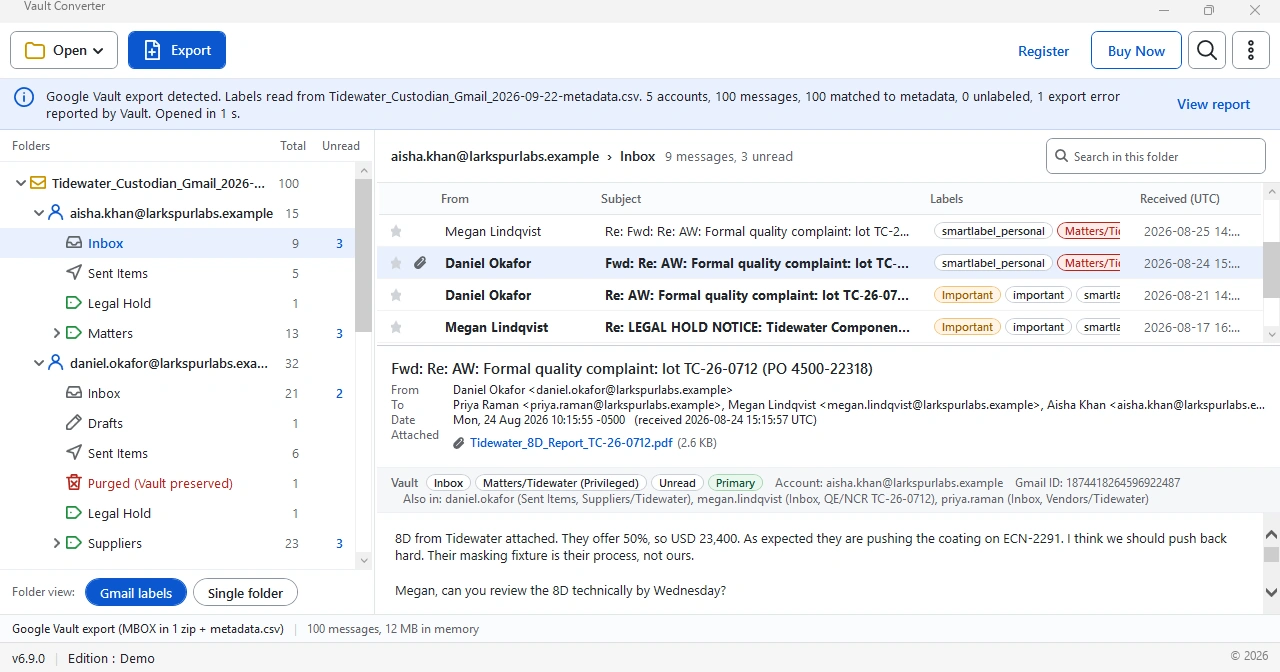
| Preview | Click a row in Vault search results to preview an item | Browse in the mail client after the import | Browse accounts, folders, labels and message previews before you export |
| Where it runs | In your browser at vault.google.com | In the mail client you install | On your Windows PC. File output stays offline |
Google lists Outlook for PST files and Thunderbird for MBOX files. Steps for both are in How to Open a Google Vault Export.
The Short Version From Export to Output
Export From Vault
Create the export in Google Vault and download the files to your PC.
Open the Export Folder
Click Open in Vault Converter, then Select folder... The software reads the data type for you.
Select a Format and Convert
Click Export, select the output and a destination, then select Export now. Open the result when it finishes.
What Every Data Type Converts To
Every Vault data type has its own output. Gmail has the widest choice.
| Vault data type | What Vault gives you | Output from Vault Converter | Converter page |
|---|---|---|---|
| Gmail | PST or MBOX with metadata files | Eight file formats including PST, EML and PDF. Mailbox upload is also available | Google Vault Gmail Converter |
| Drive | ZIP archives of converted files | Native files | How Vault Converter Works |
| Chat | PST or MBOX files packed in ZIP archives | Google Vault to PDF Converter | |
| Groups | PST or MBOX files packed in ZIP archives | Google Vault to PDF Converter | |
| Voice | PST or MBOX, plus MP3 voicemail | MP4 | How Vault Converter Works |
| Calendar | ICS or PST | ICS | How Vault Converter Works |
| Gemini | A ZIP archive with one XML file per conversation owner | Google Vault to PDF Converter |
Need Outlook files? See the Google Vault to PST Converter page. Need readable files for review? See the Google Vault to PDF Converter page.
Built for Real Export Jobs
Export Files and Metadata XML Together
Loads the Vault ZIP with its metadata XML and CSV files in one pass, so message details stay linked to the right mail.
Gmail Labels Rebuilt as Folders
Restores the folder structure that a Vault export does not keep, so mailboxes look the way users remember them.
Attachments and Inline Images Kept
Every attachment and inline image stays with its own message.
Filter by Custodian, Date or Service
Select only what you need and skip the rest. Select one account or folder, or write one PST file per account.
Preview Before Converting
Browse the matter inside the software first. Confirm the data, then start the conversion.
Runs on Your Own PC
Export files stay on your machine unless you select mailbox upload as the output.
Three Jobs Vault Converter Handles
Admins, legal teams and records teams use it for different reasons.
Move to Microsoft 365
Vault removes export files after 15 days, so download early. Write PST files for the import and keep Gmail labels as folders. The Google Vault Migration Guide covers routes and limits.
Build Review Sets
Keep the original export unchanged and convert copies into PDF or PST for readers. A review platform takes the original. The Google Vault eDiscovery and Compliance guide covers custody and holds.
Keep a Readable Archive
Google describes Vault as a retention and eDiscovery service, not a permanent archive. Convert Vault data to pages and files you control with the Google Vault to PDF Converter.
What Vault Converter Does Not Do
Know the limits of the software before you buy.
- It does not create the export. You build it in Google Vault and download the files, then Vault Converter reads them. The Google Vault Export Guide has the steps.
- It does not move matters or holds. Those live in Vault and not in the export files, so rebuild them in the new system. See the Google Vault Migration Guide.
- It runs on Windows only. There is no Mac version.
- The free trial converts the first 10 messages of every MBOX file.
- It is independent software. Google does not endorse it.
Chain of custody stays in your hands. Vault Converter writes its output to the destination you select in the Save step, so the downloaded export stays where it is. Keep that export with its metadata files and hash values unchanged, convert a copy and write the batch down. The Google Vault eDiscovery and Compliance guide lists what to keep.
What Google Vault Does Not Keep or Search
Know the gaps before you plan the job.
| Service | What Google says Vault leaves out |
|---|---|
| Chat | Drive files shared in Chat appear as links only. Rich text formatting is not kept. |
| Gemini | Media attachments and generated media files are not kept. |
| Drive | Vault ignores folders, shortcuts and Apps Script files. |
| Gmail | Vault search indexes about 1 MB of every message. |
Vault Converter converts what the export holds. It cannot add what Vault did not keep. Source: Google Vault Help on supported services and data types.
Vault Converter Quick Facts
Facts you need before the download.
| Item | Detail |
|---|---|
| Version | 6.9 |
| Publisher | Univik Inc. See About Vault Converter |
| Download size | 18 MB |
| Platform | Windows 10 (32-bit or 64-bit) and Windows 11 (64-bit) |
| Experience | In software since 2013 |
| License | One-time payment in three plans: Personal, Business and Forensics. Free updates |
| Trial | The first 10 messages of every MBOX file, with no time limit |
| Requirements | Windows 10 or 11, .NET Framework 4.8 or higher, 4 GB of RAM and 50 MB of disk space |
Guides for Every Stage of the Job
Short guides, checked against Google and Microsoft pages, that cover exports, conversion, migration, eDiscovery and errors.
Google Vault Export Guide
How to export every data type and what the formats mean.
Open the guideHow to Open a Google Vault Export
Learn which program opens MBOX, PST and ZIP files.
Open the guideGoogle Vault Migration Guide
Move Vault data into Microsoft 365 and other systems.
Open the guideGoogle Vault eDiscovery and Compliance
Exports, chain of custody and PDF sets for legal work.
Open the guideGoogle Vault Export Errors and Fixes
Partial results, expired links and failed downloads solved step by step.
Open the guideOne Payment. No Subscription.
Choose by the number of PCs you need. The software is the same in every plan.
Personal
Best for one person
- Install on 2 PCs
- Every data type, every format, unlimited conversions
- Free updates and a 30-day money-back guarantee
BusinessMost chosen
Best for a team
- Install on 10 PCs
- Every data type, every format, unlimited conversions
- Free updates and a 30-day money-back guarantee
Forensics
Best for legal and eDiscovery teams
- Install on 50 PCs
- Every data type, every format, unlimited conversions
- Free updates and a 30-day money-back guarantee
Check out on the Buy Vault Converter page, by card or PayPal.
Common Questions
Which Google Vault data types does Vault Converter support?
It supports Gmail, Drive, Chat, Groups, Voice, Calendar and Gemini exports. Gmail has the most output choices, with eight file formats and mailbox upload.
Is Vault Converter affiliated with Google?
No. Vault Converter is independent software and is not affiliated with or endorsed by Google.
Which output formats does Vault Converter create?
Eight file formats for Gmail data, from PST and EML to PDF and HTML. Chat, Groups and Gemini data output as PDF. The Google Vault Gmail Converter page lists every format.
Does Vault Converter send my Google Vault data over the internet?
No. Saving files runs on your Windows PC and sends nothing out. Data leaves the PC only when you select a mailbox upload as the output.
Is there a free version, and what does the trial convert?
There is a free trial, not a free full version. The trial converts the first 10 messages of every MBOX file. It has no time limit, so you can test the output before you buy.
What do I need to run it?
Windows 10 or 11 with .NET Framework 4.8 or higher and 4 GB of RAM. Windows 10 can be 32-bit or 64-bit, and Windows 11 is 64-bit only. Use 8 GB for large exports.
Do I need Outlook to use Vault Converter?
No. Outlook is not required to run the software or to create a PST. It matters only when you open the PST afterward.
What do Google Vault export files look like before conversion?
Gmail arrives as PST or MBOX. Chat and Groups come as ZIP archives holding PST or MBOX. Drive arrives as a ZIP. Calendar arrives as ICS or PST. Vault adds metadata as XML or CSV.
How is Vault Converter different from Google Vault?
Google Vault creates the export. Vault Converter converts the exported files on your PC into formats you can open, search and move.
Does Vault Converter work on a Mac?
No. The software installs on Windows 10 and 11 only. Convert the export on a Windows PC.
Does Vault Converter create the Google Vault export?
No. You create the export in Google Vault and download the files. Vault Converter then reads them. The Google Vault Export Guide has the steps.
Does Vault Converter move matters and holds?
No. Matters and holds stay in Vault. The export files hold messages and metadata, so you rebuild holds in the new system. The Google Vault Migration Guide covers it.
What can I load into Vault Converter?
Load the export folder or a single ZIP or MBOX file. Unzipping is not needed.
How do I know the conversion worked?
The report at the end lists messages saved, folders created and any errors. Select Save report... to keep a copy, then compare the totals with the result counts file from Vault.
Try Vault Converter on Your Own Export
The free trial converts the first 10 messages of every MBOX file. No card needed.