How to Open a Google Vault Export Read MBOX, PST and ZIP Files in Outlook or as PDF
A Google Vault export from Google Workspace is raw data. This guide shows which program opens every file type and when to convert it first.
- Which program opens PST, MBOX and ZIP
- Steps for Outlook, Thunderbird and Apple Mail
- Why every email is in one folder
- Check files with MD5 before you open them
- Read the metadata CSV in Excel
- Checked against Google and Microsoft help
By Shubham Dixit, Data Scientist and Technology Writer | Last checked 5 October 2026
How to Open Every Google Vault Export Type
| Your export | How to open it |
|---|---|
| Gmail MBOX | Thunderbird and Apple Mail open MBOX files. Outlook needs a PST, so run the Google Vault to PST Converter first. Steps are in the MBOX section. |
| Gmail PST in many parts | Open every PST in Outlook, or load all parts into a converter for one run. If parts are missing, open Google Vault Export Errors and Fixes. |
| Metadata files | CSV and XML files that describe every message, plus MD5 hash values for every file. Keep them next to the messages. They are not messages to open. |
| Chat or Groups | Archives with PST or MBOX inside. Unzip the archive, then open the PST in Outlook or convert to PDF with the Google Vault to PDF Converter. |
| Gemini | A zipped archive with an XML file per conversation owner. Convert to PDF to read the conversations. |
| Voice | Texts and call logs arrive as PST or MBOX and voicemail as MP3 files. Vault Converter outputs Voice as MP4. |
| Calendar | ICS or PST. Open ICS in a calendar app. Vault Converter outputs ICS. |
| Drive ZIP | Docs arrive as DOCX, Sheets as XLSX and Slides as PPTX, so Office opens them without conversion. |
What Is Inside a Google Vault Export
Vault never hands you one mailbox file. It gives you archives, message files and the data that describes them. Know the pieces before you open anything.
| Service | Message files | Extra files |
|---|---|---|
| Gmail | export_name-N.zip holding PST files that split at 1 GB, or MBOX files that split at 10 GB | Metadata as CSV and XML, a result counts CSV, an errors XML and an optional export_name-drive-links.csv |
| Groups and Chat | ZIP archives holding PST or MBOX files. Chat includes the matching messages plus surrounding messages from the same conversation or thread | Metadata as XML and CSV, a results count CSV and an error CSV |
| Drive | export_name_N.zip files of up to 10 GB. Every file is named with its original name, an underscore and its Drive file ID | Metadata with fields like DocID, Author, Hash and FileSize |
| Voice | One ZIP per account with PST or MBOX files. They hold text conversations, call logs, voicemail MP3 audio, voicemail transcriptions and call transcripts | Metadata and count files |
| Calendar | A ZIP with ICS files or a PST | Metadata CSV, a result counts CSV and an errors XML |
| Gemini | export_name.zip with one XML file per conversation owner. It includes prompts and responses from 12 hours before and after a match | XML fields: Email, ConversationId, ConversationTopic, ConversationTurn and Timestamp |
The Gmail metadata CSV holds one row per message with the columns Rfc822MessageId, GmailMessageId, Account, From, To, CC, BCC, Subject, Labels, DateSent and DateReceived. The Gmail result counts file lists Email, AccountStatus, SuccessCount and MessageErrorCount for every account. Google also supplies MD5 hash values for the files. Windows opens a ZIP with right-click and Extract All.
Open a Vault PST in Outlook
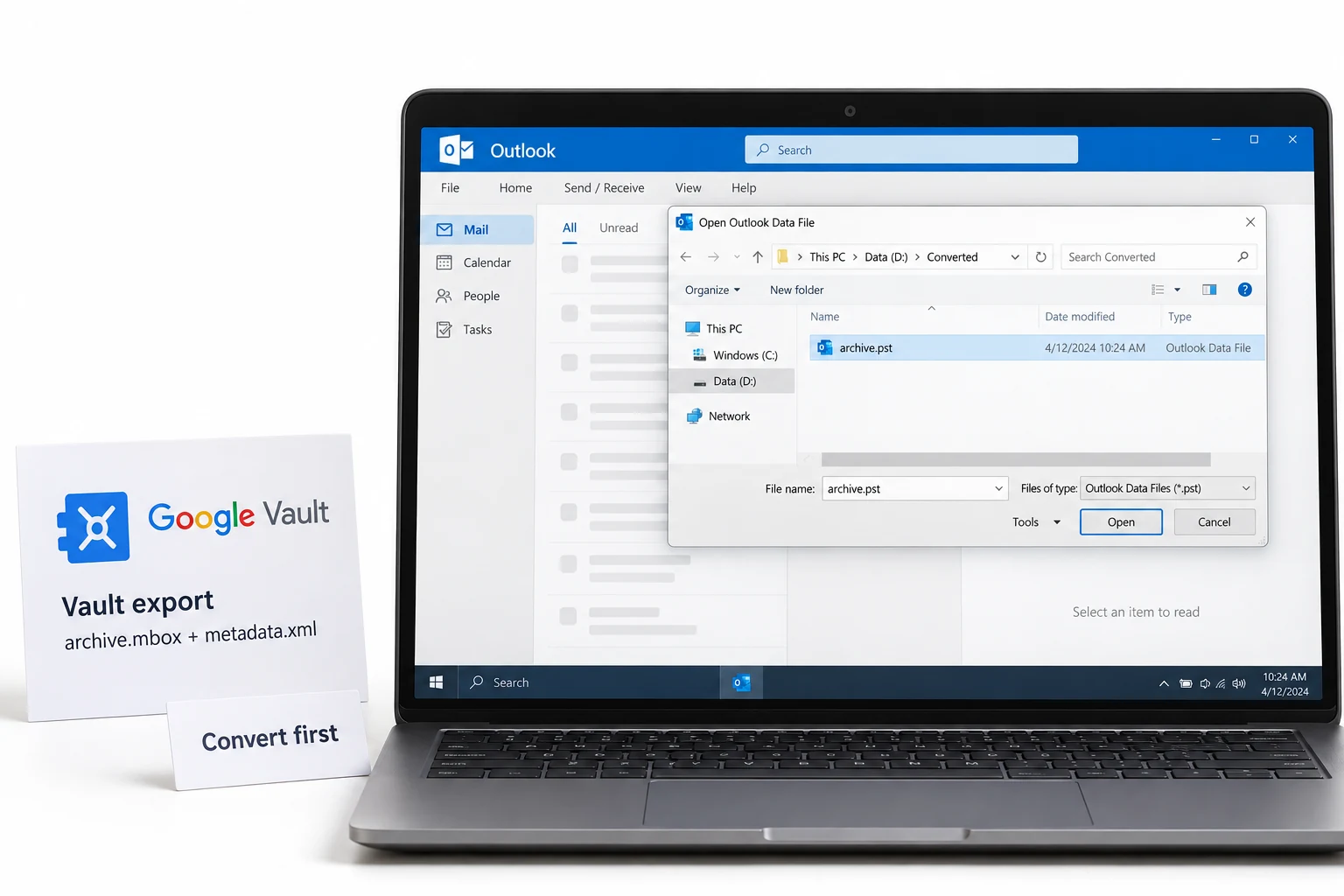
Google's review guidance lists Outlook for PST files. Open every part the same way. Which steps apply depends on the Outlook you run.
Classic Outlook
Choose File > Open & Export > Open Outlook Data File and select the PST. Expand the top level of the file in the Navigation pane to see its folders. Outlook searches only the current mailbox by default, so change the search scope to All Mailboxes to search the PST.
New Outlook
Go to Settings > Files > Outlook Data Files, select Add file, select the PST and select Open. Microsoft lists these requirements:
- Classic Outlook must also be installed, and both versions must use the same architecture, 32-bit or 64-bit.
- The account in new Outlook needs a Microsoft 365 subscription.
- The ARM version of new Outlook does not support PST files.
- New Outlook cannot be in Safe or Recovery mode.
New Outlook can also import a PST into a mailbox through Settings > Data files > Import. To read a PST without importing it, open the PST as a data file. Google's guidance also notes that all messages appear in a single folder, which the next section explains.
Why Every Email Is in One Folder
Gmail uses labels, and a Vault export does not convert them to folders. Google states that all messages appear in a single folder when you review the files. The label names are not lost. The metadata file keeps them in the Labels column, one row for every message.
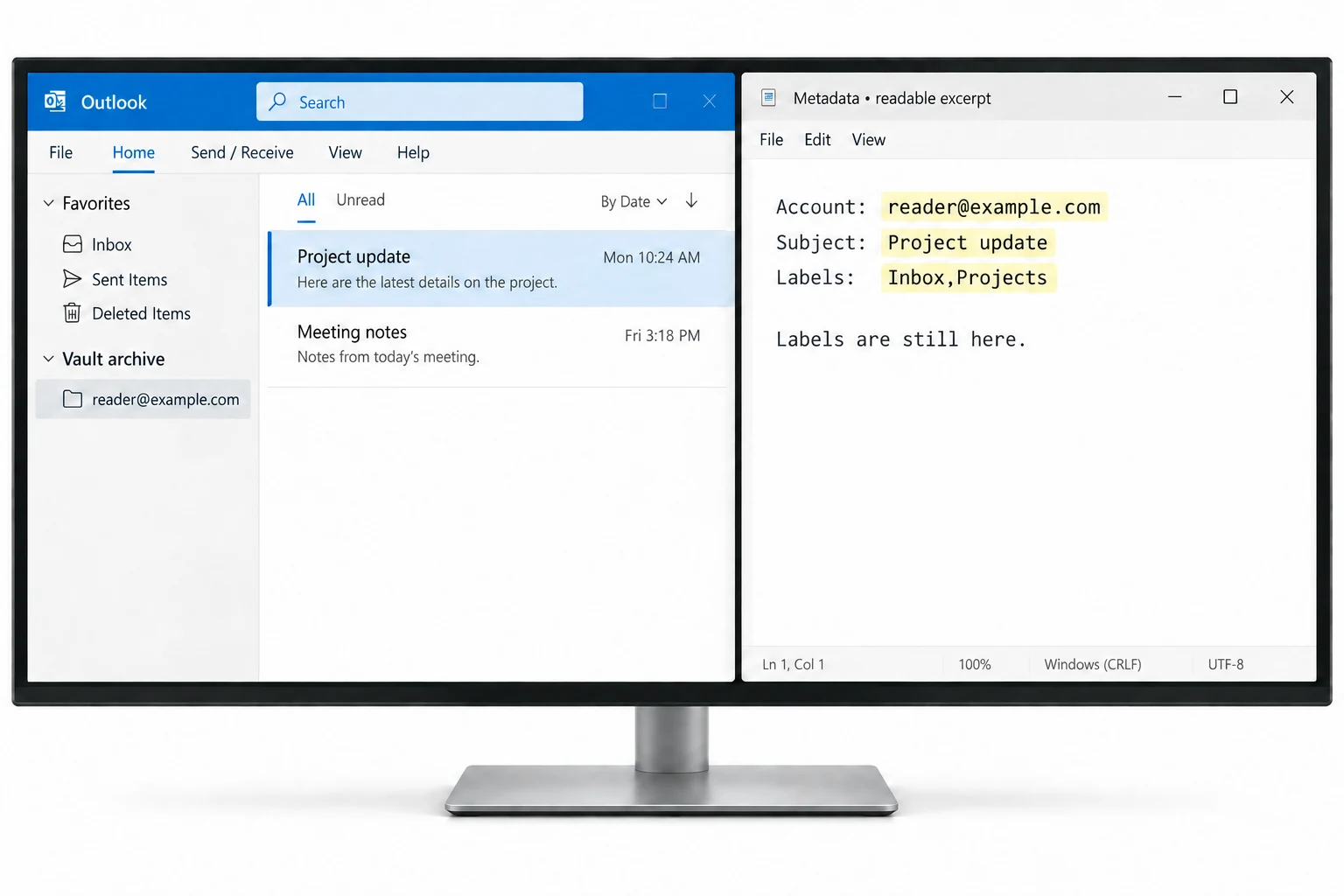
You have two options. Filter the metadata CSV by label to find the messages you need. Or convert the export with a tool that converts the Labels back to folders. The Google Vault Gmail Converter and the Google Vault to PST Converter do this from the metadata file.
Open a Vault MBOX in Thunderbird, Apple Mail or a Text Editor
Google lists Thunderbird, a text editor and litigation support systems for MBOX files. A text editor shows the raw message text, which suits a quick check but not reading mail. Outlook is not on Google's list for MBOX files, so convert the file to PST with the Google Vault to PST Converter first.
Thunderbird
Thunderbird imports MBOX files through a third-party add-on named ImportExportTools NG:
Install the add-on
Install ImportExportTools NG from the Add-ons menu in Thunderbird.
Create a local folder
Create a new folder under Local Folders to receive the mail.
Import the MBOX
Right-click the folder, select ImportExportTools NG and choose Import mbox file. Then select Import directly one or more mbox files and select your extracted MBOX files.
The mail goes into Local Folders on your computer, not in an online account.
Apple Mail
Choose File > Import Mailboxes, select Files in mbox format and select the MBOX file. Apple Mail places the messages in a new mailbox named Import.
Match a message to its metadata
Google describes a way to tie a message in an MBOX file to its metadata row. In Thunderbird choose View > Headers > All and compare the Message-ID with the Rfc822MessageId column in the metadata file. In a text editor, match the FileName value to the From_ line that starts the message in the MBOX file.
Google says it has no tool to bulk import MBOX files. If you need the mail in another mailbox, a converter with mailbox upload moves it for you.
Check Files With MD5 Before You Open Them
Google supplies MD5 hash values for the files in an export. A matching hash shows that a file arrived unchanged, which matters for legal holds and audits. On Windows, open Command Prompt and run certutil -hashfile "C:\path\to\file.zip" MD5. Compare the result with the hash value Vault lists for that file.
Read the Metadata CSV in Excel
The metadata CSV opens in Excel, which holds up to 1,048,576 rows and 16,384 columns. Excel reads a UTF-8 CSV correctly by double-click only when the file has a byte order mark. If names with accents look unreadable, use Data > Get Data > From Text/CSV and select UTF-8 as the file origin.
Open Chat, Groups, Gemini, Voice and Drive Files
Unzip first. Chat and Groups archives hold PST or MBOX files, so open them with the steps above or convert them to PDF with the Google Vault to PDF Converter. A Gemini ZIP holds XML files, and XML is plain text, so a text editor shows it. Voice voicemail arrives as MP3 audio, which any audio player opens.
Drive files keep the Drive file ID in the name. Docs become DOCX and Sheets become XLSX. Forms become ZIP and Slides become PPTX. Drawings and Sites become PDF. Use the metadata CSV to match a file to its owner and hash. For export steps and limits, see the Google Vault Export Guide.
Sources: Google's guidance on reviewing exported messages and export file contents, and Microsoft's page on opening a PST file in Outlook. Last checked 5 October 2026.
Google Vault to PST Converter
Convert MBOX and PST exports into clean Outlook PST files.
Google Vault Migration Guide
Moving Vault data to a new system? Plan the move here.
Open the guideFrequently Asked Questions
Can Outlook open a Google Vault MBOX file?
Not directly. Google's review guidance lists Thunderbird for MBOX files and Outlook for PST files. To read an MBOX in Outlook, convert it to PST first.
Can I open a Google Vault export without Outlook?
Yes. Thunderbird and Apple Mail open MBOX files, and a text editor shows the raw message text. PST files need Outlook. To read a PST without it, convert the export to PDF and open the PDF on any device.
What is inside a Google Vault export?
Message files in PST or MBOX format, or converted files for Drive. Vault adds metadata as CSV or XML, a count file, an error file and MD5 hash values for the files.
Which program opens a Google Vault PST file?
Outlook. In classic Outlook choose File > Open & Export > Open Outlook Data File. In new Outlook go to Settings > Files > Outlook Data Files and select Add file.
Why are all my Vault emails in one folder?
A Vault export does not convert Gmail labels to folders, and Google says all messages appear in a single folder. The metadata file keeps the labels, and a converter can rebuild them as folders.
How do I open a Vault MBOX file in Thunderbird?
Install the third-party ImportExportTools NG add-on, right-click a local folder and choose Import mbox file. The mail goes into Local Folders.
How do I open a Vault MBOX file on a Mac?
In Apple Mail choose File > Import Mailboxes, select Files in mbox format and select the file. Apple Mail puts the messages in a new mailbox named Import.
How do I open a Google Vault Gemini export?
A Gemini export is a ZIP with an XML file per conversation owner. Unzip it and read the XML files, or convert them to PDF.
How do I open Google Vault Chat exports?
Chat exports arrive as ZIP archives that contain PST or MBOX files. Open them as mail files, or convert them to PDF to read them without a mail client.
What happens to a Google Vault Drive export?
Drive exports as ZIP files of up to 10 GB. Docs arrive as DOCX, Sheets as XLSX and Slides as PPTX, so Office opens them directly.
How do I check the MD5 hash of a Vault export file?
On Windows run certutil -hashfile followed by the file path and MD5 in Command Prompt. Compare the result with the hash value Vault lists for that file.
Key Takeaways
- Outlook opens PST files, and Google's guidance lists Thunderbird for MBOX files.
- To use an MBOX in Outlook, convert it to PST first.
- Every email goes into one folder because labels do not become folders. The metadata file keeps the labels.
- Chat, Groups and Voice arrive in ZIP archives with PST or MBOX inside.
- Drive converts Docs, Sheets and Slides to DOCX, XLSX and PPTX.
- Check MD5 hash values before you open files that serve as evidence.
Shubham Dixit
Shubham Dixit is a Data Scientist and Technology Writer and a Subject Matter Expert at Hostvik. His work covers email solutions and office productivity tools. He wrote this guide so readers know which program opens every Vault file type and what every file holds.
Keep Exploring
Google Vault Export Guide
Formats, split sizes and limits for every Vault data type.
Open the pageGoogle Vault Migration Guide
Plan the move of Vault data into Outlook and Microsoft 365.
Open the pageGoogle Vault eDiscovery and Compliance
Chain of custody, metadata XML and PDF review sets.
Open the pageGoogle Vault Export Errors and Fixes
Fix partial results, expired links and failed downloads.
Open the pageGoogle Vault Gmail Converter
Eight file formats and mailbox upload for Gmail exports.
Open the pageGoogle Vault to PDF Converter
Convert Vault data to readable PDF sets for review and records.
Open the pageTry Vault Converter on Your Own Export
The free trial converts the first 10 messages of every MBOX file. No card needed.