Google Vault Gmail Converter Convert Gmail Data from Vault to 8 File Formats or Upload to a Mailbox
Convert Gmail data from Google Vault in Google Workspace into eight file formats. Output PST for Outlook, EML for mail clients or PDF for review. You can also upload straight into a Gmail, Office 365 or IMAP mailbox.
Windows 10 and 11Works offlineOne-time license from $99
- PST, EML, MSG, MBOX and PDF
- Upload to Gmail, Office 365 or IMAP
- Gmail labels become folders
- Filter by custodian, date or service
- Preview folders and messages before you convert
- Purged mail listed in its own folder
All Eight Gmail File Formats and Mailbox Upload
| Output | Best for |
|---|---|
| PST | Outlook mailboxes and Microsoft 365 moves |
| EML | Single messages for Thunderbird, new Outlook and most mail clients |
| MSG | Single messages that open in Outlook |
| MBOX | Thunderbird, Apple Mail and other MBOX-based clients |
| Legal review, audits and long-term records | |
| HTML | Reading mail in any web browser |
| CSV index | Spreadsheet list of messages to search and sort in Excel CONFIRM CSV index fields |
| Attachments only | Saving only the attachments as files |
| Gmail, Office 365 or IMAP upload | Sending mail straight into a live mailbox with no files in between |
Need only one format? Open the Google Vault to PDF Converter page or the Google Vault to PST Converter page.
EML, MSG, MBOX or PST: Which Format Fits?
The first question is how many messages a file holds. A PST or MBOX file holds many messages. An EML or MSG file holds one. Select the format by the program that must read the result.
| Format | Holds | Opens in |
|---|---|---|
| PST | Many messages in one Outlook data file | Outlook, the program Google names for PST review |
| MBOX | Many messages in one file | Thunderbird (Google lists it) and Apple Mail through File > Import Mailboxes |
| EML | One message in the internet message format of RFC 5322, with MIME for attachments | Most mail clients. Microsoft says new Outlook opens EML files by double-click and Outlook on the web opens them by drag and drop |
| MSG | One Outlook item, in Outlook's own file format | Outlook files. The export window labels it for Outlook |
MBOX has no single official standard. RFC 4155 registers the application/mbox media type and says so. That is one reason to test a sample in your target client before you convert a full matter. For reading steps, check How to Open a Google Vault Export.
What Vault Gives You for Gmail
Vault exports Gmail data as PST or MBOX, with a metadata XML file next to it. The Google Vault Export Guide shows how. Vault splits PST output at 1 GB and MBOX output at 10 GB. Vault also puts every message in one folder, because it does not convert labels into folders.
That is why a raw export is hard to use. Vault Converter loads the files together and rebuilds the folder structure from your labels with the Like Gmail layout. Attachments and inline images stay with their messages. To open MBOX in Outlook, use How to Open a Google Vault Export.
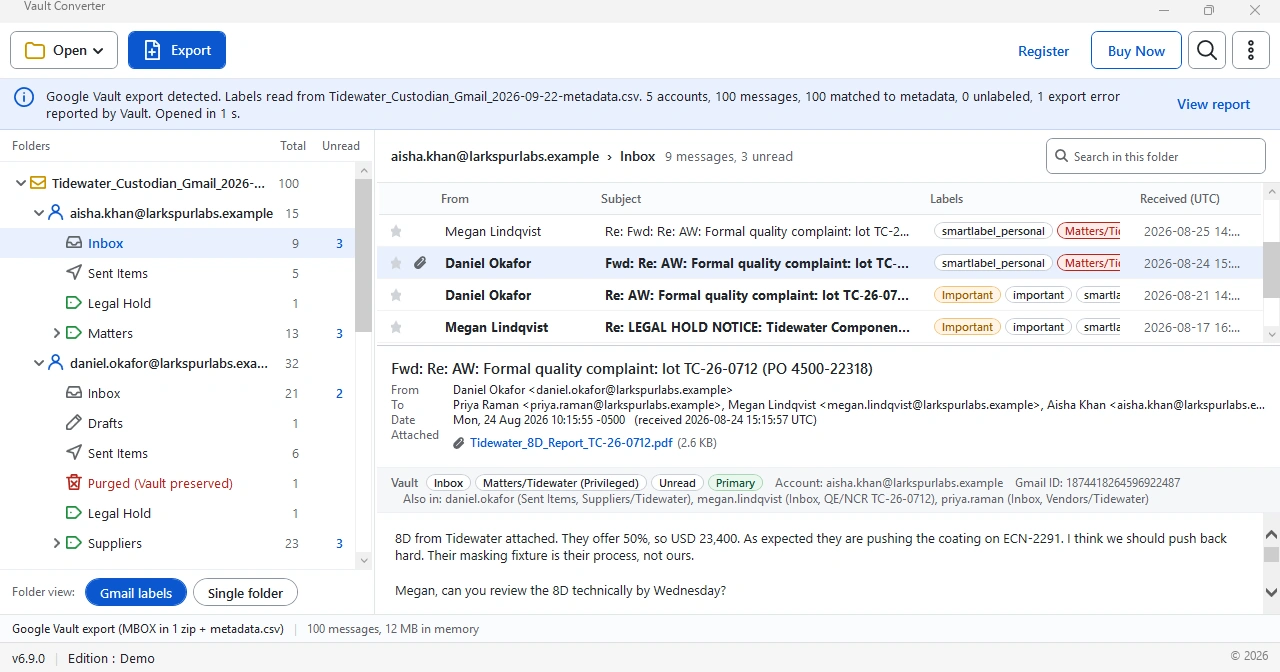
Preview the Export Before You Convert
The main window shows the export before you convert a single message. A banner reports that the labels were read from the metadata CSV, how many messages matched the metadata and how many came without a label. The folder tree groups folders and labels under every account. In the sample export, the banner also showed one export error reported by Vault.
Switch the folder view between Gmail labels and Single folder. Search inside a folder and open a message to read its headers, body and attachments. The Labels column and an Also in line show where else a message appears. In the Export window, select Everything or Only the selected folder or account, then select a format.
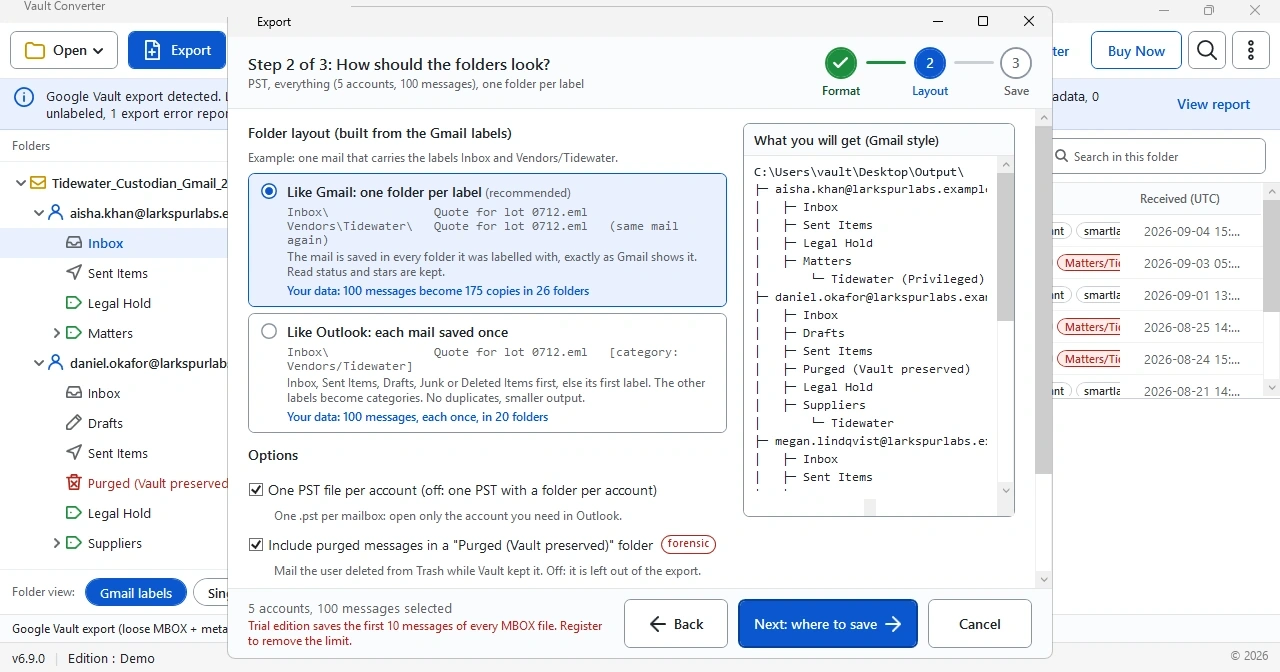
Choose Like Gmail or Like Outlook
Step 2 of the export asks how the folders should look. It applies to EML and PDF output as well as PST. Like Gmail builds one folder per label and saves a message in every folder that matches one of its labels. Read status and stars are kept. Like Outlook saves a message once. It goes in Inbox, Sent Items, Drafts, Junk or Deleted Items when it belongs there. Otherwise it goes under its first label. The other labels become categories, so there are no duplicates and the output is smaller.
Two options appear below the choice. One PST file per account writes a separate PST for every mailbox, so you open only the account you need in Outlook. Clear the box to get one PST with a folder for every account. The purged option, described below, is selected in the sample.
Filter Before You Convert
Large exports hold more than you need. Filter by custodian, date or service, then convert only that data. You save time and get smaller output.
Upload Into Gmail, Office 365 or an IMAP Server
The export window offers three mailbox targets next to the file formats: Gmail (Google mailbox), Office 365 (Microsoft mailbox) and IMAP server (any mail server). Saving files runs on your PC. An upload sends mail over the internet, so plan the target first.
| Target | Plan around |
|---|---|
| Gmail | Gmail receives messages up to 50 MB on Enterprise Standard and 70 MB on Enterprise Plus, measured after encoding. IMAP uploads to Gmail stop at 500 MB per day |
| Office 365 | Exchange Online defaults to 35 MB sending and 36 MB receiving, and admins can set 1 MB to 150 MB. Mailboxes hold 100 GB on most plans, 50 GB on Office 365 E1 and 2 GB on F3 |
| IMAP server | IMAP is the protocol in RFC 9051 for managing mail on a server. Check the server's own message size and daily limits before you start |
Microsoft notes that IMAP and PST migrations fall under the general message size limit, so check that limit before a bulk upload and test with one small folder first. For a PST route into Microsoft 365, use the Google Vault to PST Converter page.
Use CSV Index and Attachments Only
CSV index writes a spreadsheet list of the exported messages. Excel holds up to 1,048,576 rows in one worksheet and the header row takes one, so a sheet holds 1,048,575 messages. Filter a very large matter first. Vault's own metadata CSV already holds sender, recipients, subject, labels and both dates. The index gives you a list that matches your output. Attachments only saves the files from the messages with no mail around them, which suits a review of documents.
Held and Purged Mail in the Export
When a user deletes a message that is on hold, Vault does not purge it. The user loses access, and an admin can still search and export it. The layout step has an option to include purged messages in a folder named Purged (Vault preserved), marked forensic. It covers mail the user deleted from Trash while Vault kept it. Clear the option and that mail is left out of the output.
Sources: Microsoft Learn on Exchange Online limits. Google on Gmail receiving limits, Gmail bandwidth limits and Gmail holds in Vault. Microsoft on the MSG format and opening EML files. Last checked 5 October 2026.
Related Guides
Frequently Asked Questions
Which output formats does the Gmail converter support?
Eight file formats: PST, EML, MSG, MBOX, PDF, HTML, CSV index and Attachments only. You can also upload straight into a Gmail, Office 365 or IMAP mailbox.
Can I convert Gmail MBOX and PST exports from Vault?
Yes. Vault Converter reads both formats, together with the metadata XML that comes with the export.
Which Vault Gmail files should I keep in the export folder?
Store the PST or MBOX parts with their CSV or XML metadata in one folder. Vault also adds MD5 hash values for all files.
Can I convert only some users or dates?
Yes. Filter by custodian, date or service before you start. Only the selected mail is converted.
Does the free trial cover every format?
Yes. The trial converts the first 10 messages of every MBOX file in any supported format.
Which folder layouts can I choose for Gmail output?
The Layout step offers two choices. Like Gmail builds one folder per label. Like Outlook saves every mail once.
Can the Gmail converter upload mail into Office 365?
Yes. The export window offers upload to a Gmail, Office 365 or IMAP mailbox as an alternative to saving files.
When should I select HTML or CSV index for Gmail data?
Both are among the eight formats. Select HTML for pages you read in a browser and CSV index for a list of the messages.
What is the difference between EML and MSG?
EML holds one message in the internet message format, and most mail clients open it. MSG holds one Outlook item in Outlook's own format. Select EML to move mail between programs and MSG for Outlook.
What do I need before I upload into Office 365?
A mailbox with room for the mail. Microsoft lists 100 GB on most plans and 50 GB on Office 365 E1. Exchange Online defaults to 35 MB sending and 36 MB receiving per message.
Does the converter show messages that users deleted?
Yes, when Vault preserved them. A hold keeps a deleted message from being purged, and Vault Converter lists it in a Purged (Vault preserved) folder.
How many messages can the CSV index hold for Excel?
Excel holds up to 1,048,576 rows in one worksheet and the header row takes one, so a sheet holds 1,048,575 messages. Filter a very large export first, then create the CSV index for the part you need.
Key Takeaways
- Vault delivers Gmail data as PST or MBOX.
- The converter saves eight file formats: PST, EML, MSG, MBOX, PDF, HTML, CSV index and Attachments only.
- PST and MBOX hold many messages. EML and MSG hold one.
- Mailbox upload to Gmail, Office 365 or IMAP replaces saving files. Check the target's size limits first.
- Preview the export, labels and purged mail before you convert.
- PST output with the Like Gmail layout rebuilds Gmail labels as folders.
- The free trial covers the first 10 messages of every MBOX file.
Keep Exploring
Google Vault to PST Converter
Convert Vault MBOX and PST exports into clean Outlook PST files.
Open the pageGoogle Vault to PDF Converter
Convert Vault data to readable PDF sets for review and records.
Open the pageHow It Works
Four steps from export to output, plus system requirements.
Open the pageGoogle Vault Migration Guide
Plan the move of Vault data into Outlook and Microsoft 365.
Open the pageGoogle Vault Export Errors and Fixes
Fix partial results, expired links and failed downloads.
Open the pageGoogle Vault eDiscovery and Compliance
Chain of custody, metadata XML and PDF review sets.
Open the pageTry Vault Converter on Your Own Export
The free trial converts the first 10 messages of every MBOX file. No card needed.