Google Vault to PDF Converter Convert Vault Data to PDFs You Can Open, Read and Share
Convert Google Vault exports from Google Workspace to PDF files that anyone can open, read and share. Convert Gmail, Chat, Groups and Gemini data in bulk, with attachments saved next to every PDF.
Windows 10 and 11Works offlineOne-time license from $99
- One PDF for every message
- Headers and labels on top of every PDF
- Attachments saved next to the PDF files
- Chat, Groups and Gemini convert too
- Filter by custodian, date or service
- Original export stays unchanged
How to Convert a Vault Export to PDF
Download the Export From Vault
Put every export part and the metadata XML file in one folder. The Google Vault Export Guide covers the download steps.
Open the Export and Preview the Matter
Click Open, then Select folder... Browse the accounts and folders inside the software to confirm it is the right export.
Filter and Select PDF
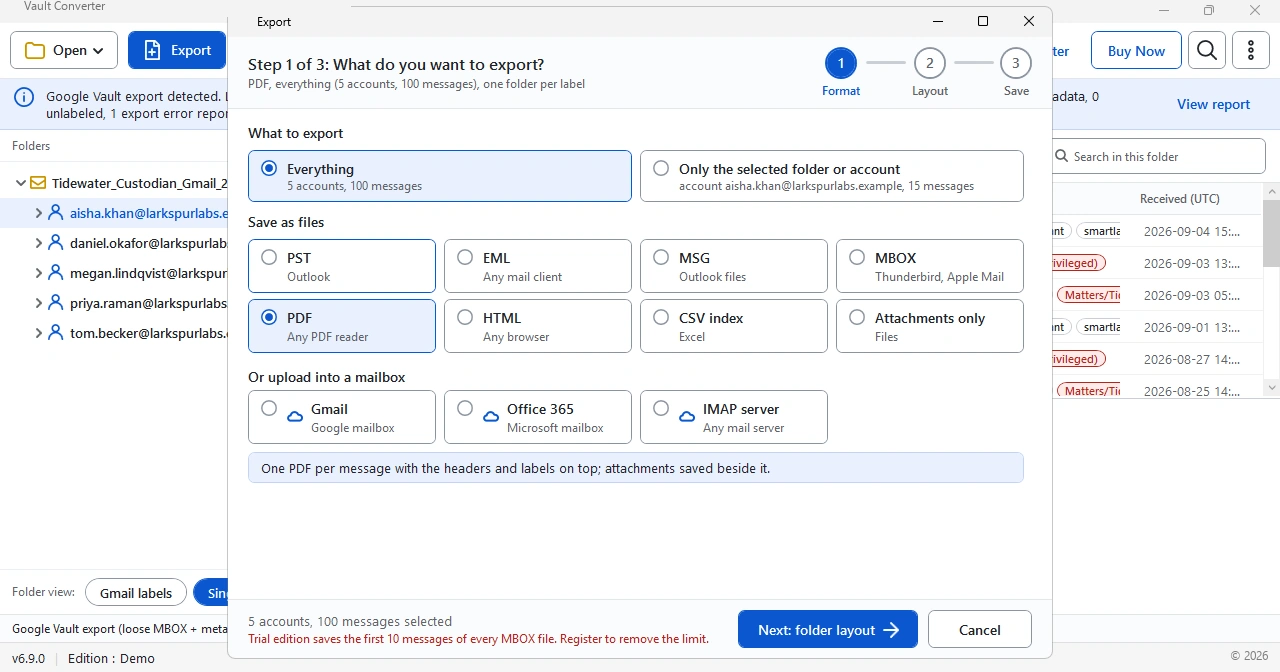
Filter by custodian, date or service. Then click Export and select PDF under Save as files.
Export Now and Open the PDFs
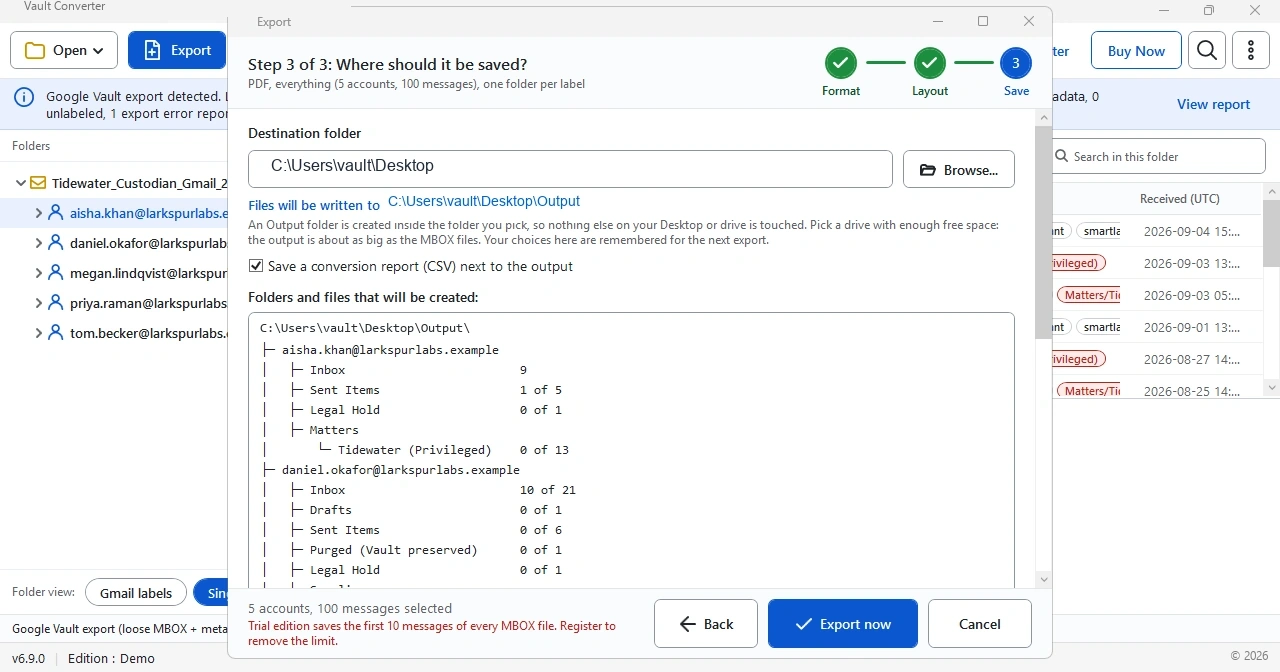
Follow the Layout and Save steps, then select Export now. Click Open Output folder when the report shows Done. Need Outlook files instead? Use the Google Vault to PST Converter.
Does Google Vault Export Emails to PDF?
No. Vault exports Gmail, Chat and Groups as PST or MBOX files. Google's export pages list no PDF option for them. Google lists PDF output only for Drive Drawings and Drive Sites pages. Gmail search results do have a Print button for one message and a Print thread button for a thread, but Google does not call either one a PDF export.
Printing from preview also has a ceiling. A long thread shows only its latest 100 messages in preview, while an export holds every message that matches the search.
| Service | What Vault exports | PDF from Vault |
|---|---|---|
| Gmail | PST or MBOX files | None |
| Chat and Groups | ZIP archives with PST or MBOX inside | None |
| Gemini | ZIP archive holding XML files, one per conversation owner | None |
| Drive | Converted files in DOCX, XLSX and PPTX | Drawings and Sites pages only |
Ways to Save Vault Emails as PDF
Five routes exist. The right one depends on how many messages you have.
| Method | How it works | Limit |
|---|---|---|
| Vault search preview | Click Print on a message or Print thread, then choose a PDF destination in your browser's print dialog | One message or thread at a time. Google does not describe PDF output for this button |
| Outlook | Open the PST, open a message, then print it with Microsoft Print to PDF. In new Outlook choose More actions > Print > Print | Needs a PST first. Microsoft documents printing attachments as a separate step |
| Thunderbird | Import the MBOX with the ImportExportTools NG add-on, then press Ctrl+P and choose a PDF destination | Mozilla community answers point to a third-party add-on for saving many messages |
| Apple Mail | Select messages, then choose File > Export as PDF | Mac only. Apple does not say if many messages become one PDF or several |
| Vault Converter | Open the export folder, select PDF, set Layout and Save, then select Export now | Windows only. The trial converts the first 10 messages of every MBOX file |
Manual routes work for a handful of messages. Past that the clicks add up, and every route except the Print button in Vault search starts in a mail client. How to Open a Google Vault Export shows those import steps.
Why Renaming an MBOX File to PDF Does Not Work
Some forums suggest renaming the file. It fails because an extension is only a label. A PDF file starts with the header %PDF-, which is hex 25 50 44 46 2D, and PDF readers look for it. An MBOX file is plain text with every message joined together, and every message begins with a line that starts with From. A PST is Outlook's own data file, the Personal Storage Table. None of them holds PDF pages, so a rename leaves the same content under a new name. Conversion is the only route: the software reads every message and writes real PDF pages.
When PDF Is the Right Output
| Job | Why PDF fits |
|---|---|
| Legal review | Reviewers open PDF on any device with no mail client |
| Audits and regulators | Stable files that look the same for every reader |
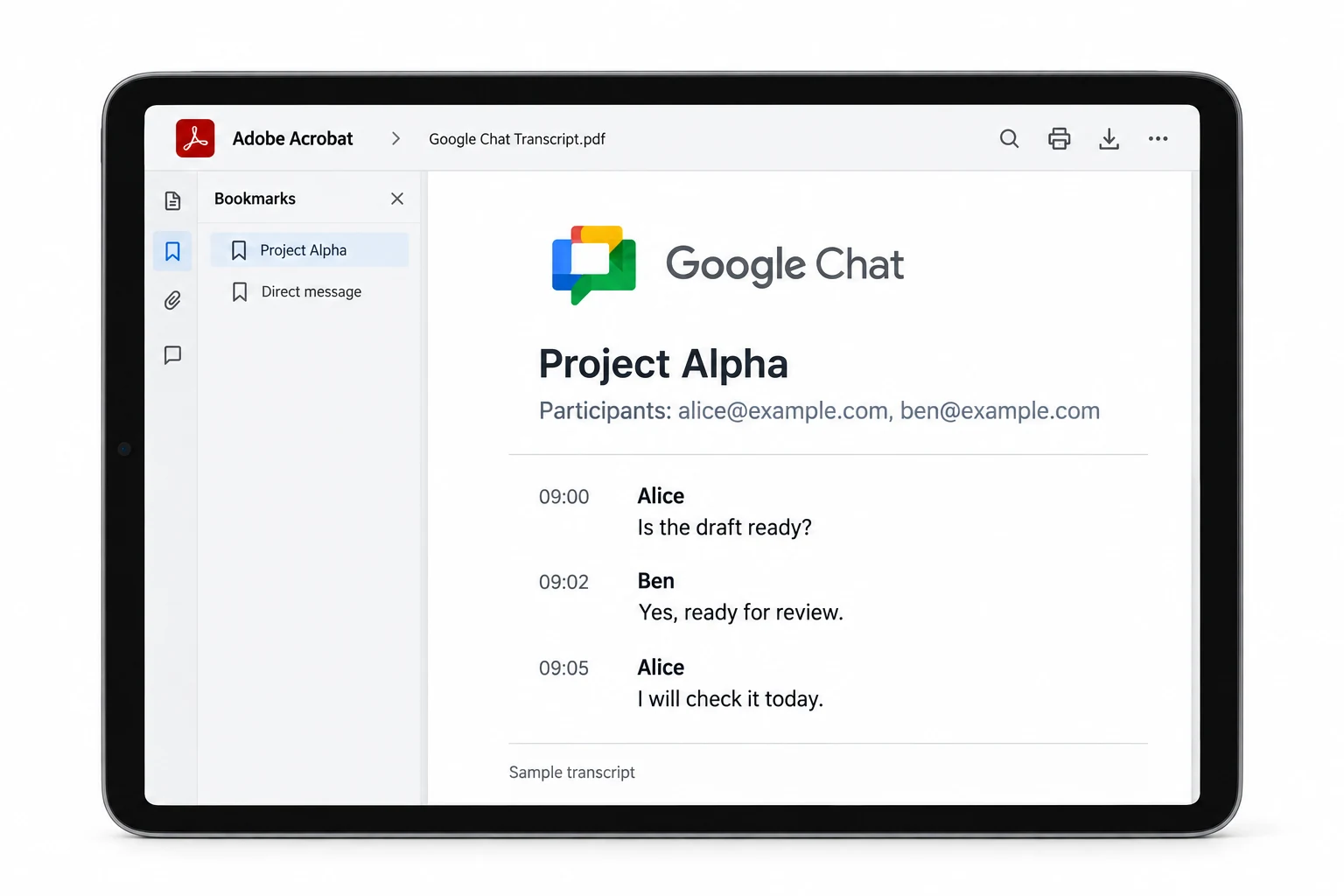
| Chat and Groups data | Raw transcripts become readable pages |
| Gemini conversations | Vault gives a ZIP of XML files, and PDF makes them readable |
| Long-term records | One format that stays readable when mail programs change |
Keep Review Sets Clean
Vault exports can hold years of mail from many custodians. Converting all of it into one big batch makes review slow. Filter first, then export only the account or folder a reviewer needs. Every reviewer gets only the batch they need. For Gmail you can also use the Google Vault Gmail Converter to output other formats.
Convert Chat, Groups and Gemini Data to PDF
Chat and Groups arrive as ZIP archives that hold PST or MBOX files. Chat exports add the other messages from the same conversation or thread as a match, and the metadata lists RoomID, Participants and ConversationType fields. Gemini data reaches you as a ZIP archive with XML files, one per conversation owner. Every file covers the prompts and responses within 12 hours either side of a match.
Raw files like these are hard to read. PDF gives you pages that anyone can open. For what every file holds, read How to Open a Google Vault Export. Drive needs no PDF step, because Vault already converts Docs to DOCX, Sheets to XLSX and Slides to PPTX.
Check the PDF Set Against the Vault Export
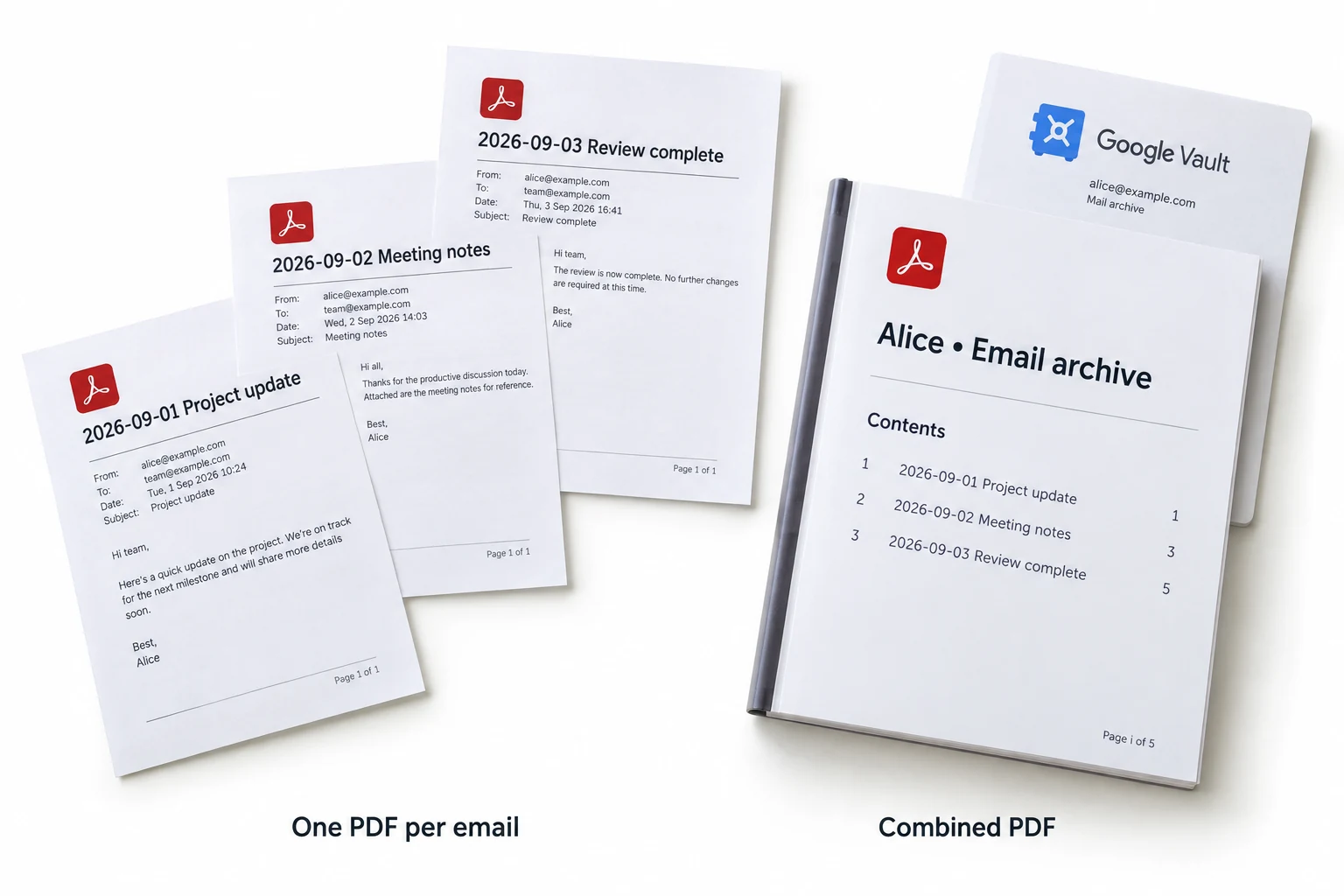
Check a conversion before you share it. Add up the SuccessCount values in the Gmail result counts file and compare the total with the message PDFs only, not the saved attachments. The Like Outlook layout writes one PDF for every message, so the counts line up. The Like Gmail layout adds a copy for every label. Read the conversion report CSV that the software saves next to the output, too.
Which Form Does a Legal Production Need?
PDF suits review, sharing and records. A production to a court or another party follows the form that the parties agree on or a judge orders. Rule 34 of the US Federal Rules of Civil Procedure asks for the form in which data is kept in normal use or a reasonably usable form, and it does not name PDF. Ask counsel before you convert a production set, and keep the original export unchanged.
Sources: Google Vault Help on export file contents and printing from Gmail search results. Microsoft Support on saving an Outlook message as PDF and printing attachments. Cornell Law School on Rule 34. Last checked 5 October 2026.
Sample Run: 100 Vault Messages to PDF
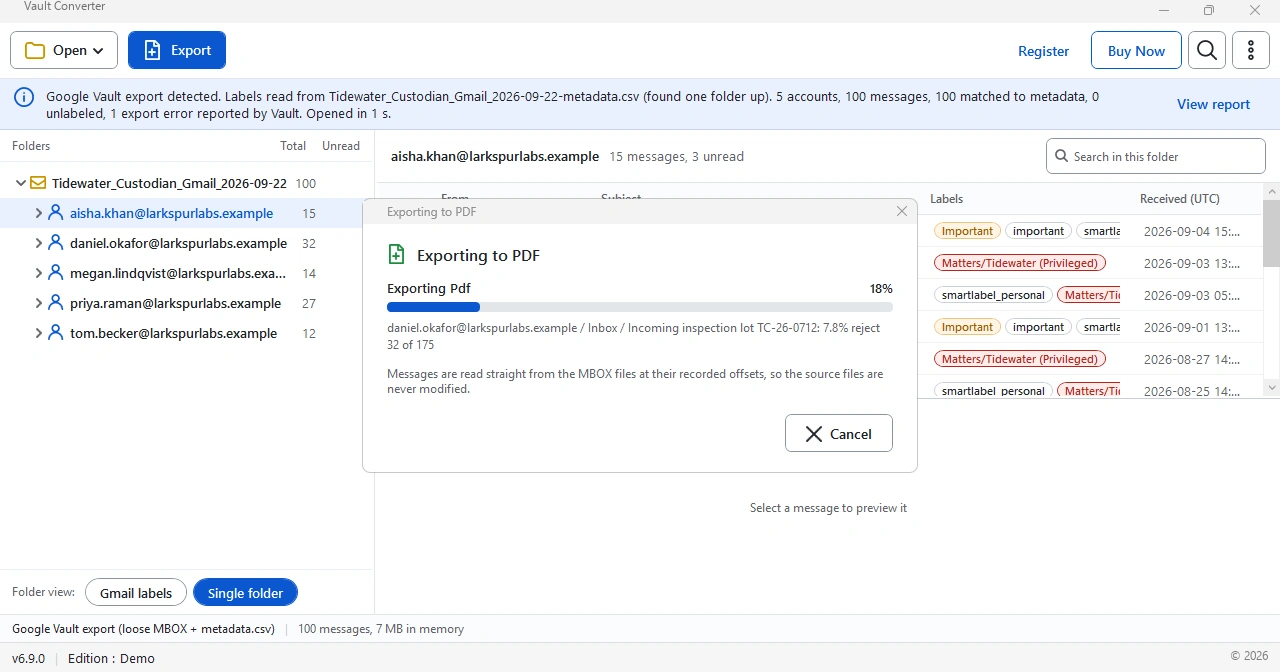
We started a PDF export on the same 100-message sample in the trial edition (v6.9). The progress window reads messages straight from the MBOX files so source files stay unchanged.
| Item | Result |
|---|---|
| Source loaded | 5 accounts and 100 messages using 7 MB in memory |
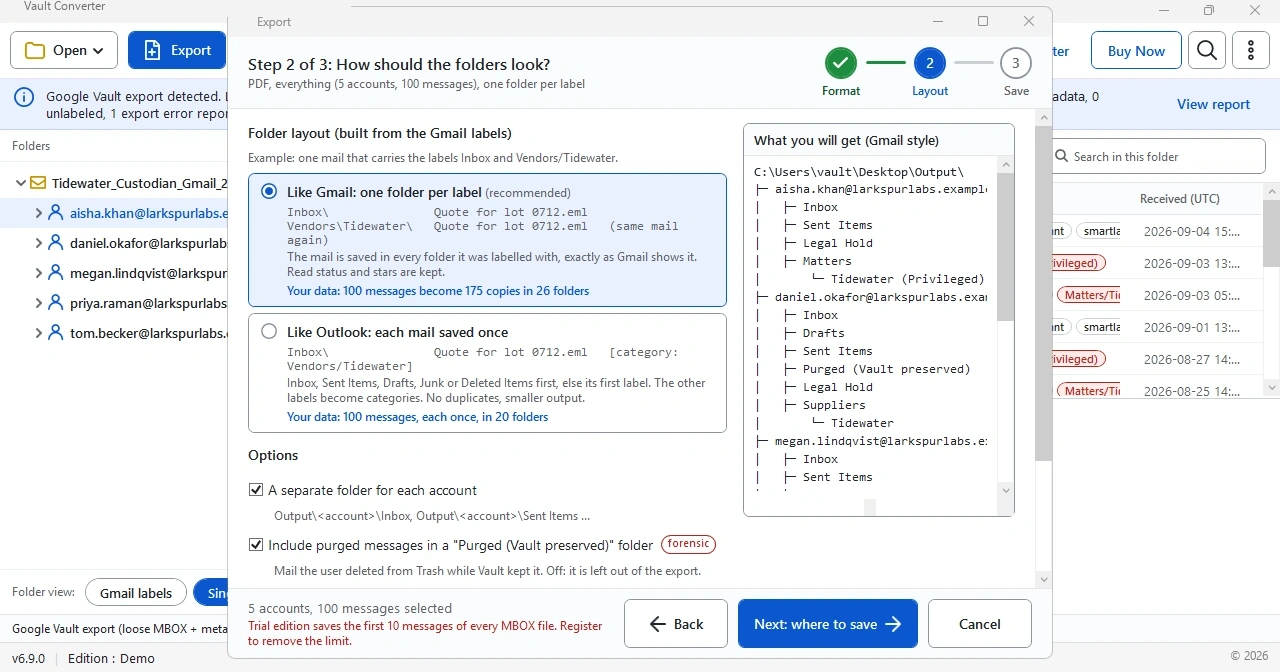
| Like Gmail layout | Every label gets a folder, so the 100 messages count as 175 items in 26 folders |
| Like Outlook layout | Every message is saved once, so the run lists 100 items in 20 folders |
| Progress window | Shows the percentage and the running count against 175 items for the Like Gmail layout |
Select Like Outlook when reviewers must not see duplicates. Select Like Gmail when the label folders matter. The trial saves only the first 10 messages of every MBOX file, so a trial run writes fewer files than these counts.
Related Guides
Frequently Asked Questions
Can I convert Google Vault exports to PDF?
Yes. Vault Converter converts Gmail messages to PDF. It also creates PDF from Chat, Groups and Gemini exports.
Can I get one PDF set for every custodian?
Yes. Output a separate PDF set for every custodian, so reviewers get clean, labeled batches.
Are attachments included in the PDF output?
Yes. With the Like Outlook layout, every message becomes one PDF with the headers and labels on top, and Like Gmail writes an extra copy into every label folder. Attachments are saved next to it.
Can I filter before creating PDF?
Yes. Filter by custodian, date or service first. Only the selected data is converted.
Does Vault Converter need an internet connection?
No. PDF output is written on your Windows PC with no internet connection.
Which other outputs can I use for the same export?
You can also select PST, EML, MSG, MBOX, HTML, CSV index or Attachments only. Upload into Gmail, Office 365 or IMAP mailboxes is available too.
Does the Google Vault PDF converter keep Gmail labels?
Yes. Every PDF shows the labels in the header block above the message.
Can I try the Google Vault PDF converter before I buy?
Yes. The free trial converts the first 10 messages of every MBOX file. Open the PDF files and check the layout before you buy.
Does Google Vault export emails as PDF?
No. Vault exports Gmail, Chat and Groups as PST or MBOX. Google lists PDF output only for Drive Drawings and Sites pages.
Can I rename a Vault MBOX file to PDF?
No. A PDF file starts with a %PDF- header, and an MBOX file is plain text. Renaming swaps the label, not the content, so convert the file instead.
Can I save Vault emails as PDF without software?
For a few messages, yes. Import the MBOX into Thunderbird or Apple Mail, because Outlook needs a PST. Then print every message to PDF, or use Print in Vault search results. Every route needs a mail client or the Vault search page and gets slow past a handful of messages.
Does printing from Outlook include attachments?
Not automatically. Microsoft documents printing attachments as a separate step, so you print them yourself. Vault Converter saves attachments next to every PDF.
Key Takeaways
- Choose PDF when readers have no mail client or no Outlook.
- Vault has no PDF export for Gmail, Chat or Groups.
- Like Outlook writes one PDF for every message, while Like Gmail copies a message into every label folder.
- Attachments are saved next to the PDF files.
- Renaming a file to .pdf does not convert it.
- Filter by custodian, date or service before the conversion starts.
- Chat, Groups and Gemini data convert to PDF in the same job.
Keep Exploring
Google Vault to PST Converter
Convert Vault MBOX and PST exports into clean Outlook PST files.
Open the pageGoogle Vault Gmail Converter
Eight file formats and mailbox upload for Gmail exports.
Open the pageHow It Works
Four steps from export to output, plus system requirements.
Open the pageHow to Open a Google Vault Export
Learn which program opens MBOX, PST and ZIP files.
Open the pageGoogle Vault Export Errors and Fixes
Fix partial results, expired links and failed downloads.
Open the pageGoogle Vault Migration Guide
Plan the move of Vault data into Outlook and Microsoft 365.
Open the pageTry Vault Converter on Your Own Export
The free trial converts the first 10 messages of every MBOX file. No card needed.